
Vondran Legal® Software Audits and Compliance Defense: Solidworks settlements. If yo ureceived a letter from Dassault or Harness Dickey BEFORE YOU ENGAGE WITH THEIR MEDIATORS contact us to discuss our copyright defense services and low flat rate fees. We can be reached at (877) 276-5084. We have settled over a 1,000 software disputes since 2004.

Introduction
When clients begin evaluating SOLIDWORKS, one of the most common points of confusion is understanding the differences between the three core packages: SOLIDWORKS Standard, SOLIDWORKS Professional, and SOLIDWORKS Premium. Each tier builds upon the previous one, adding increasingly sophisticated tools that move from basic design functionality to full-scale engineering validation and systems development. Choosing the right package is not just a matter of budget, but of aligning the software's capabilities with your business goals, product complexity, and workflow requirements. This blog is a general overview of the differences in their software programs that come into play during settlement negotiations. This information comes from ChatGPT so it may not be 100% accurate, but it should provide you with a general understanding of the differences in their products so you or your company can decide which one is best for you.
Solidworks Standard
SOLIDWORKS Standard is the foundation of the platform and is often where individuals and smaller teams begin. It provides all the essential tools required to create accurate 3D models, assemblies, and detailed 2D manufacturing drawings. Users can design parts, build assemblies, and produce technical documentation suitable for fabrication and production. Standard also includes core features such as sheet metal design, weldments, and basic surface modeling, which are widely used across mechanical engineering and product design industries. Additionally, it includes basic simulation capabilities that allow for simple stress analysis and interference detection, helping ensure that parts fit together correctly and perform as expected under light conditions. For businesses primarily focused on design and documentation—such as startups, freelance engineers, or companies producing relatively simple products—SOLIDWORKS Standard is often sufficient. It enables users to move from concept to production-ready drawings efficiently without introducing unnecessary complexity.
Solidworks Professional
SOLIDWORKS Professional builds on this foundation by introducing tools that enhance productivity, collaboration, and data management. While it includes everything found in Standard, it adds a layer of automation and intelligence that becomes valuable as projects grow in size and complexity. One of the most notable additions is a comprehensive library of standard components and parts, which allows users to quickly insert commonly used hardware such as fasteners, bearings, and gears into their designs. This significantly reduces design time and helps maintain consistency across projects. Professional also includes advanced visualization tools that allow users to create high-quality renderings, making it easier to present concepts to clients or stakeholders without needing separate rendering software. Another key feature is file management and version control, which becomes critical when multiple team members are working on the same project. These tools help prevent errors, track revisions, and maintain organization within larger design environments. Cost estimation features are also included, allowing users to evaluate manufacturing expenses early in the design process. For growing businesses, engineering teams, or companies that need to streamline workflows and improve collaboration, SOLIDWORKS Professional represents a meaningful step up from Standard.
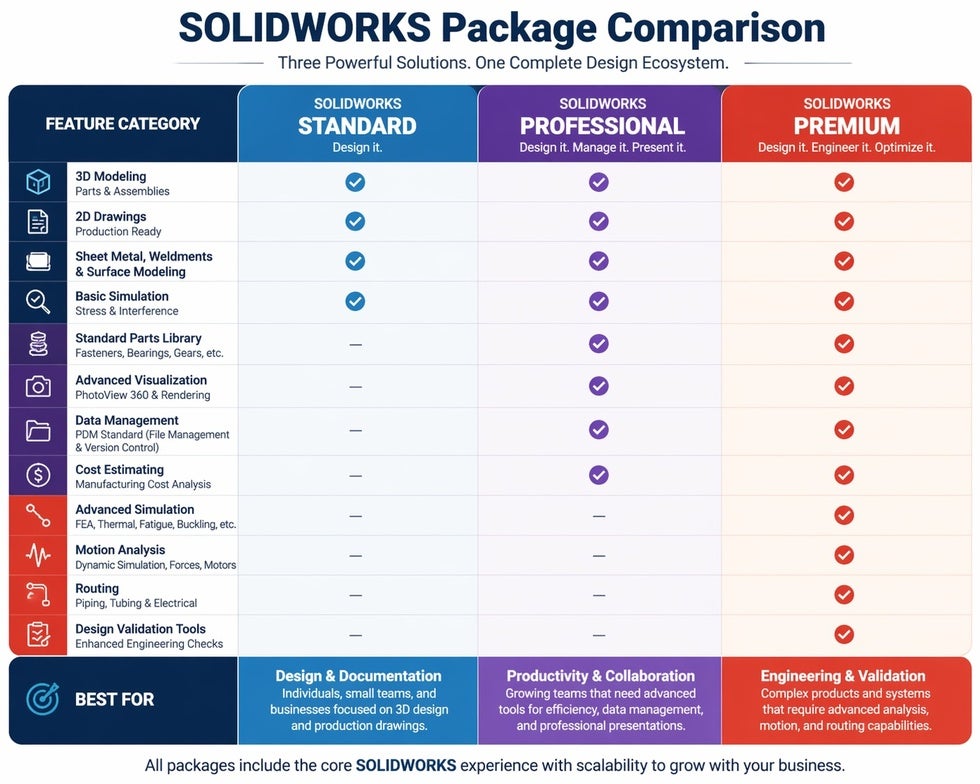
SOLIDWORKS Premium is the most advanced package and is designed for organizations that require in-depth engineering analysis, system-level design capabilities, and comprehensive validation tools. It includes all features from both Standard and Professional but extends them with powerful simulation and motion analysis tools. With Premium, users can perform advanced finite element analysis to evaluate how a product will behave under real-world conditions such as stress, vibration, and thermal loads. This level of simulation allows engineers to identify potential failures before physical prototypes are built, saving both time and cost. Motion analysis tools go beyond simple animations by calculating forces, velocities, and interactions between moving components, which is particularly valuable for machinery, robotics, and mechanical systems. Another major addition is routing functionality, which enables the design of piping, tubing, and electrical wiring systems directly within assemblies. This is essential for industries that deal with complex system integration, such as automotive, aerospace, and industrial equipment manufacturing. Premium effectively transforms SOLIDWORKS from a design tool into a full engineering platform capable of supporting product development from concept through validation and optimization.
Final Points
From a practical standpoint, the decision between these three packages depends largely on the complexity of your projects and the level of analysis required. If your work is primarily focused on creating parts and assemblies with straightforward functionality, SOLIDWORKS Standard will likely meet your needs. If your team is growing and you need better efficiency, collaboration tools, and presentation capabilities, Professional offers a balanced upgrade without the full cost of advanced engineering tools. However, if your products involve moving systems, require detailed performance testing, or include integrated piping or electrical components, Premium becomes a strategic investment that can reduce risk and improve product reliability.
It is also important to consider the long-term trajectory of your business. Many companies begin with Standard or Professional and later transition to Premium as their product lines become more sophisticated. While the upfront cost of Premium is higher, it often pays for itself by reducing the need for physical prototypes, minimizing design errors, and accelerating time to market. Conversely, purchasing more functionality than you need can lead to underutilized software and unnecessary expense, which is why a careful assessment of your current and future needs is essential.
Ultimately, SOLIDWORKS offers a scalable ecosystem that allows businesses to grow into more advanced capabilities over time. Understanding the distinctions between Standard, Professional, and Premium ensures that you are not only selecting the right tool for your present requirements but also positioning your company for efficient and sustainable growth in product development.

